Fabric Apps Deep Dive: Data, Writeback, DevOps and the New Anonymous Access

This is part two of my Fabric Apps series. If you haven’t read part one yet, go read it first. Part I covers why I love what Fabric Apps brings to the table and how Rayfin lets you build an app basically by prompting an LLM.
The first post was about the big picture. Why Fabric Apps matters and how quickly you can go from a prompt to a working app. This time I want to dive deeper into the practical questions people actually asks me when I talk about the Fabric Apps: where does the data actually live, how do I get it back into my source systems like ERP and what happens to my Fabric SQL database when I delete the app. Let’s answer them one by one.
Note: Fabric Apps is still in preview. Everything below is accurate as of writing, but preview features move fast, check Microsoft Learn for the latest updates before you build on it.
Where Does the Data Actually Live?
When you decorate a TypeScript class with @entity(), Rayfin doesn’t just make up an API. It generates an actual database schema and deploys it into Fabric. That database is a Fabric SQL database, a first-class Fabric item that appears as a child item under your Fabric App in the portal.
import { entity, uuid, text, date } from '@microsoft/rayfin-core';

@entity()
export class Todo {
  @uuid() id!: string;
  @text() title!: string;
  @text({ optional: true }) description?: string;
  @date() createdAt!: Date;
  @date() updatedAt!: Date;
}
Every @entity() becomes a table. Every property becomes a column with a mapped SQL type (@text() → NVARCHAR, @int() → INT, @date() → DATETIME2, and so on). Run npx rayfin up db apply command and the schema updates gets pushed to that Fabric SQL database automatically.
Here is the big difference compared to the “normal” data engineering: the code is the source of truth not the database. You can open the SQL database in the Fabric portal and you’ll even get a query editor to run reads against it, which is really useful for debugging or building a quick Power BI report on top. But it’s read-only from the portal’s perspective. If you (or an over-eager coding agent) go and rename a column directly in SQL Server Management Studio, the next rayfin up db apply will either refuse to run or think your code is wrong and try to “fix” things.
But Is Fabric SQL the Only Option?
Not really, it’s just the only one Rayfin wires up automatically today. Fabric itself gives you a whole punch of storage engines, and nothing stops your app’s data story from being bigger than the one auto-generated SQL database:
| Storage option | Best for | Can a Fabric App use it? |
|---|---|---|
| SQL database in Fabric | Your app’s transactional, operational data | Yes, native, automatic via @entity() |
| Lakehouse (OneLake, Delta tables) | Large volumes, files, Spark/analytics workloads | Indirectly, read via GraphQL isn’t native, but you can query it separately or mirror data in |
| Warehouse | Enterprise BI, heavy SQL analytics | Same as above, outside the app’s native data model |
| Cosmos DB in Fabric | NoSQL, globally distributed apps | Not wired into Rayfin decorators today, but nothing stops a custom backend call |
| OneLake shortcuts | Zero-copy access to data that already lives elsewhere in OneLake | Handy for referencing existing lakehouse data from a wider Fabric solution |
The practical pattern: use the auto-generated Fabric SQL database for the app’s own operational state (requests, order handling, form submissions, whatever your entities are), and use shortcuts to bring in read-only reference data to the the rest of your Fabric estate. Expose your reference data for other workloads. All data in Fabric whether Lakehouse, Warehouse or your app’s own SQL database lands in OneLake underneath.
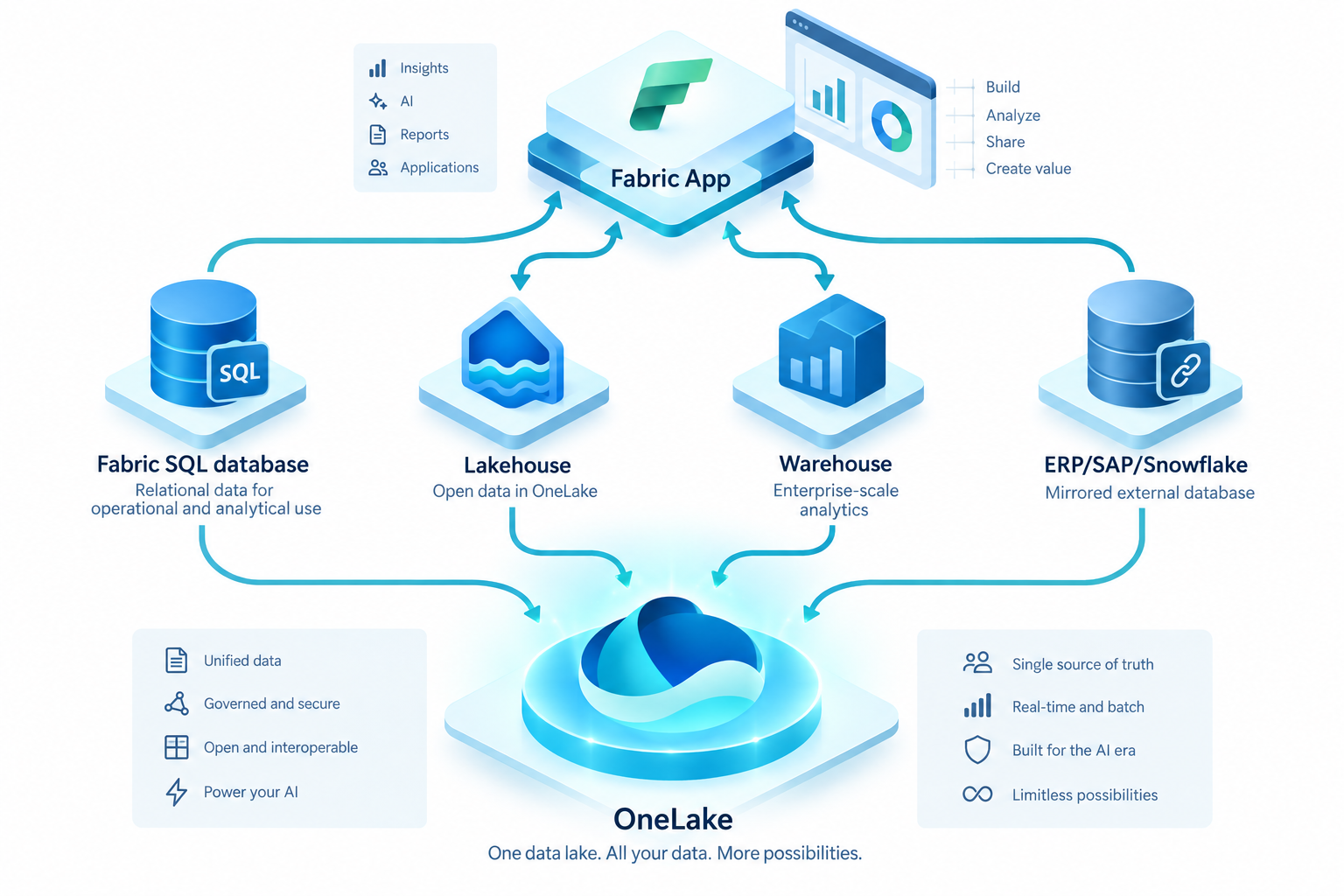
Fabric SQL database is the default storage for Fabric apps, but nothing prevents you from using some other Fabric storages or even storages outside of Fabric.
Writing Data Back Into Fabric and Into Your ERP
This is one of the biggest advantages of the Fabric Apps. A Fabric App isn’t a read-only reporting tool it can also write! (Maybe insert here joke about two police officers where one can read and other can write).
Writing back into Fabric
The RayfinClient gives you a fully typed GraphQL client generated straight from your data model. You don’t hand-write GraphQL you call typed methods and the client builds the mutation for you:
const client = new RayfinClient<Schema>({
  baseUrl: import.meta.env.VITE_RAYFIN_API_URL,
  publishableKey: import.meta.env.VITE_RAYFIN_PUBLISHABLE_KEY,
});

await client.todo.create({
  title: "Ship the blog post",
  isCompleted: false,
});
Under the hood this hits /api/graphql on your app’s backend URL, and the write lands directly in the Fabric SQL database, respecting whatever row-level policy you attached with @role(). That’s the “writeback” story for the app itself, and it’s the same conceptual pattern Fabric uses elsewhere for planning writeback (budgets, forecasts, targets flowing back into Fabric SQL/OneLake so Power BI and semantic models can reason over them). Your Fabric App is just a flexible, custom-built writeback app.
Writing back into the source system (yes, even the ERP)
Ok, lets be straight here: Fabric Apps doesn’t come with a “write to ERP” button. There’s no built-in ERP connector in the rayfin.yml config today. What you do get is a TypeScript backend, and that means you can write whatever custom logic you want inside it, including calling out to an ERP’s REST/OData API, a message queue, or a middleware layer that your integration team already trusts.
The pattern I would recommend:
- Let the Fabric App own the user-facing transaction, the form, the approval, the request, stored in its own Fabric SQL entity.
- Add backend logic (or a scheduled Fabric pipeline/Data Factory activity, or an Azure Function sitting outside Rayfin) that picks up new/changed rows and pushes them to the source system through its supported API.
- Treat the Fabric SQL table as the queue/log of “things that need to go back to the ERP” rather than trying to write directly to the ERP from inside a user’s browser session.
This keeps your app’s authentication and row-level security model completely separate from your ERP’s credentials, which matters a lot because you never want ERP service-account secrets sitting in a static frontend bundle that’s served from a public URL.
Security responsibility split, directly from Microsoft’s own docs: Fabric handles SSO, row-level security, HTTPS and PKCE. You are responsible for keeping secrets out of your code and static assets, and for what your app exposes once someone is authenticated. Read that twice if you’re planning any ERP writeback. What is Fabric Apps (Preview)? - Microsoft Fabric | Microsoft Learn
Version Control and Getting to Production Without Crying
In part one I complained that Fabric doesn’t give you a place to store source code. It only stores the “compiled” app. That’s still true and it means that you own the Git story. The good news is that Rayfin CLI client supports promoting the app from dev/test to prod.
# one-time: create the project, pointed at a dev workspace
npm create @microsoft/rayfin@latest my-app --workspace my-app-dev
cd my-app

# iterate against dev
npx rayfin up --workspace my-app-dev
npm run dev
npx rayfin up db apply     # schema-only changes
npx rayfin up               # full redeploy

# when it's ready, promote to prod
npx rayfin up --workspace my-app-prod
rayfin up records each deployment (workspace ID, item ID, endpoint) so subsequent calls update the same item instead of creating duplicates. npx rayfin up switch lets you flip the CLI’s active target between my-app-dev and my-app-prod without retyping workspace names, and npx rayfin up status tells you whether the thing you just promoted is actually healthy.
A few practices Microsoft points out and that match what I would tell you anyway from years of “oops, wrong environment”:
- Source control is still on you. Git the whole project. Treat
rayfin/.envas a local pointer to which deployment is active, not as a secret store or a source of truth. - Always
--dry-runbefore touching prod.npx rayfin up --dry-run --verboseshows you exactly what the CLI would change without touching anything. - Never routinely
--forcea prod database apply. The CLI blocks destructive schema changes (dropped columns, renamed tables) on purpose. If it warns you, read the warning. - Feature branch, validate in dev, merge, then promote to prod. Standard stuff, but easy to skip when “just prompting the AI to add a field” feels so low-friction.
If you want broader Fabric CI/CD (Git integration to GitHub/Azure DevOps, deployment pipelines, the fab CLI, fabric-cicd for infra-as-code) that’s a whole separate topic in Fabric generally and it layers on top of what Rayfin does for your app. For most internal apps built by a single dev or a small team, the dev/prod workspace pattern above is honestly enough.
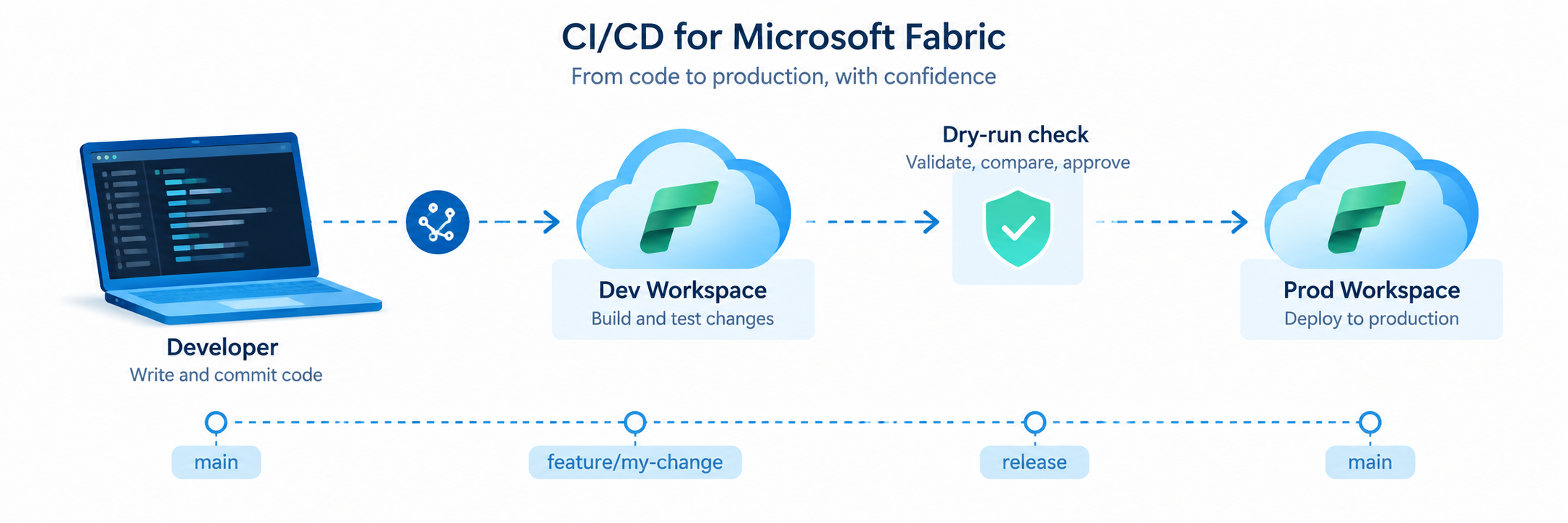
For internal apps the development driven deployment is usually enough. Don't make things too complicated if it is really not needed.
Removing an App and What You Actually Need to Clean Up
Eventually you’ll want to kill/delete the app. Maybe it was a prototype, maybe the team moved on. Here is what happens and what you need to check.
A Fabric App is a Fabric item, and depending on which services you enabled in rayfin.yml, it can have child items: the SQL database (if your app defines data models), the authentication service, and the static content hosting. When you delete the parent Fabric App item, the natural expectation is that the children go with it, but I’d still verify this in your tenant, because:
- Deleted items in Fabric go into a workspace recycle bin first. They’re recoverable during the retention period, which is good news if you delete the wrong thing on a Friday afternoon.
- After the retention period (or if you use the REST API
DELETE /v1/workspaces/{workspaceId}/recoverableItems/{itemId}to permanently delete), the item and its contents are gone for good. OneLake retains the underlying data for an additional seven days after that, but you can’t restore anything during that window either, it’s just a delayed physical cleanup, not a safety net. - If you want to nuke everything in one go rather than item-by-item, deleting the entire workspace removes every item inside it, including the Fabric App and all its child services, for every workspace member. So having an own workspace for PoC Fabric Apps is a viable strategy.
Authentication: SSO by Default, Anonymous by Choice (New!)
Once your app is deployed Microsoft Entra ID via Fabric SSO is the only supported authentication provider. During local development you can also enable password auth for convenience, but that switch does nothing once the app is live in Fabric:
services:
  auth:
    enabled: true
    allowedRedirectUris:
      - http://localhost:5173
    fabric:
      enabled: true
    password:
      enabled: true   # local development only, ignored after deploy
The sign-in flow itself is rather simple: your app opens the Fabric portal in a popup, the user authenticates via Entra ID inside that popup, and the result is handed back to your app through a postMessage handoff. No redirect page, no callback URL to babysit. It’s protected with PKCE (S256), a state nonce to stop CSRF and strict origin validation on the postMessage listener. If your app is embedded inside a Fabric iframe (opened from the Fabric portal itself), there’s an embedded mode that skips the popup entirely and grabs the session silently.
Row-level security is layered on top of this identity using the @role() decorator:
@entity()
@role('authenticated', '*', {
  policy: (claims, item) => claims.sub.eq(item.user_id),
})
export class Todo {
  @uuid() id!: string;
  @text() title!: string;
  @text() user_id!: string;
}
That claims.sub.eq(item.user_id) line is the whole “I only see my own things” trick from part one, expressed as a type-safe policy instead of hand-rolled SQL WHERE clauses.
The new bit: anonymous data access
Fabric recently added anonymous data access (preview… I know everything is preview) for Fabric Apps, and it changes the calculus for public-facing scenarios. Instead of “everyone must sign in with Entra ID,” you can now expose specific entities to unauthenticated visitors:
import { entity, role, uuid, text } from '@microsoft/rayfin-core';

@entity()
@role('anonymous', 'read')
export class Announcement {
  @uuid() id!: string;
  @text() title!: string;
  @text() content!: string;
}
You can even combine roles on the same entity, public reads, authenticated writes:
@entity()
@role('anonymous', 'read')
@role('authenticated', ['update', 'delete'], {
  policy: (claims, item) => claims.sub.eq(item.ownerId),
})
export class BlogPost {
  @uuid() id!: string;
  @text() title!: string;
  @text() content!: string;
  @text() ownerId!: string;
}
Anonymous access is deliberately layered behind three independent switches, and all three have to be on for it to actually work:
- A tenant admin setting (“Anonymous data access” under Fabric Apps preview tenant settings), off by default, can be scoped to specific security groups.
- The entity-level
@role('anonymous', ...)decorator in your data model. - Implicitly, the app itself being reachable, remember, if anyone can hit the app URL, they can hit whatever the anonymous role allows.
Note this Microsoft own guidance: grant the minimum actions required (prefer read or create alone over update/delete), limit exposed fields with include/exclude, never rely on your frontend UI as the security boundary because someone can call your GraphQL endpoint directly with curl, and plan for spam and abuse on any public create operation like a feedback form. Disabling it is as simple as removing the anonymous role and redeploying, or a tenant admin flipping the tenant switch off entirely.
My recommendation on this is that you should not trust on Fabric solely if you are building public facing apps. Add Azure Front Door or similar service on front to have mor granular control over requests.
Anonymous access means that Fabric App can now legitimately serve a public landing page, a feedback form, or a lightweight public catalog alongside an authenticated internal experience, all from the same deployment, same database, same codebase. This is good for example if company wants to build an app for third party vendors that they are using, but they are not invited into company’s Entra.
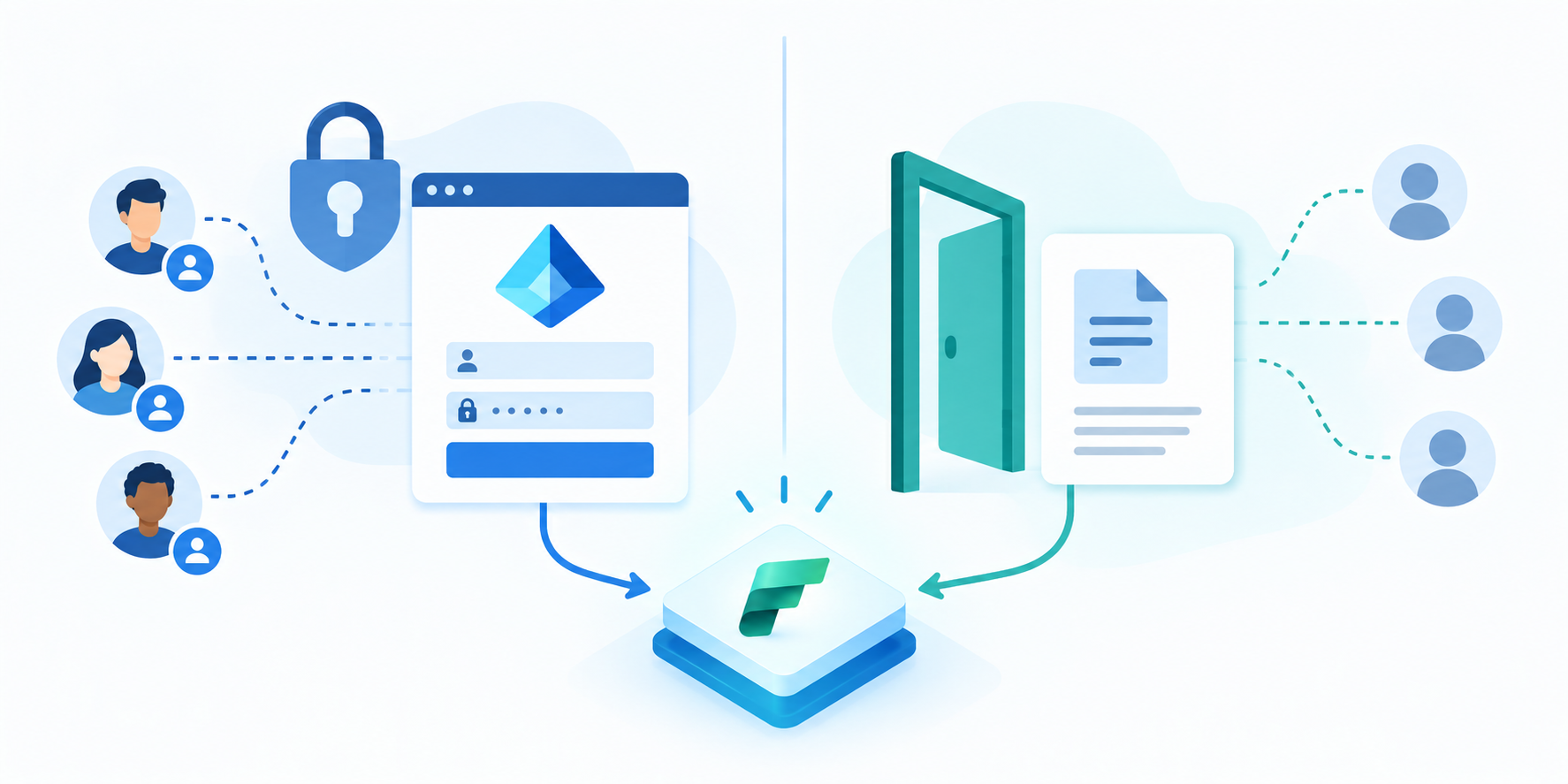
Fabric Apps supports authenticated access and anonymous access.
Summary
So, to close the loop on part two: your data lives in a real Fabric SQL database that Rayfin manages from your TypeScript code. Nothing stops you from pairing it with the rest of the Fabric storage stack (mirroring, shortcuts, Lakehouse/Warehouse). Writeback into Fabric is a first-class typed GraphQL operation. Version control is still your job, but the dev/prod workspace workflow in the Rayfin CLI makes promoting changes far less easier than building something custom.
There’s clearly more coming: the Rayfin community AMA recap mentions first-class Functions, secret management, and native version control on the roadmap. I’ll keep writing about this as it evolves. If you haven’t tried building something with Rayfin yet, the barrier to entry is genuinely just “can you write a prompt”. Go build something small and see where it breaks.