Top AI Tools for C# Developers

Ok lets start this post by saying that this topic is very much of a moving target. The tools that I am going to present in this post, might be irrelevant in next few months. Nevertheless, let’s take a look at where the world stands today and which top AI tools I recommend for every C# developer.
IDE Tools
I am going to split this post into two main topics: Visual Studio and Visual Studio Code. Based on your main IDE, you might use different kind of tools. One reason for that is that not all tools are available for Visual Studio or even Rider. VS Code has its own extension ecosystem, which produces lots of good (and bad…) AI extensions that will help you along the way. Anyway we will start from Visual Studio and then move to Visual Studio Code.
Visual Studio
GitHub Copilot

Visual Studio is still as of today the most popular IDE for C# developers. It might not be the best one out there (I like it thou), but it is the most popular. For Visual Studio the GitHub Copilot is the best AI tool. I know this is boring pick, but that is the truth. If we rollback few months the GitHub Copilot was basically a six to ten months behind its competitors like Cursor. It had very bulky Agent mode that could not do a shit and you then had the “ask” mode, which was the old way of using the LLM tools. You ask for code change and copy-paste the result into code. The Agent mode didn’t know how to make files or start a browser. It could not invoke anything from command prompt or run any scripts. It was just shortcut for ask modes copy-paste.
As of today things have gotten a little bit better. GitHub Copilot in Visual Studio still lacks behind it’s competitors (especially compared to VS Code version), but it has some neat tricks in his sleeve, that makes it actually a really good AI tool.
I like how you can select from different AI models and you can use newer models like Sonnet 4 and Gemini 2.5 Pro. You also have a selection of Open AI models, but to be honest I haven’t found them really good for coding. Usually I go with Claude Sonnet 3.7, but it is bit expensive model to go with all the time.
The agentic experience in Visual Studio is still very much in-progress. The UI has lots of rendering issues and the AI tools cannot use almost any of the Visual Studio’s features like refactoring tools etc. Still I think it has lots of potential, because the dev team can highly integrate the agent into IDE. Think about AI agent that can right-click publish your app!
Windsurf

It still surprises me that Windsurf has extension for Visual Studio. It is great to have competitors for GH Copilot and we can think Windsurf as one of them. Windsurf is a Codename for Codeium’s AI engine, which is now part of OpenAI’s tool ecosystem as OpenAI acquired it. Windsurf does not currently have agentic mode in Visual Studio. This means that it cannot operate as an independent coding agent that could create files, run commands etc. However it has nice IDE integration to refactor and explain code directly on top of methods and classes.
As of today the GitHub Copilot can also explain and refactor code + use modern models, I don’t see much of a use for Windsurf as it is current format. Maybe they will add the agentic mode in near future and it can change the game, but as of today. I would stick with GH Copilot.
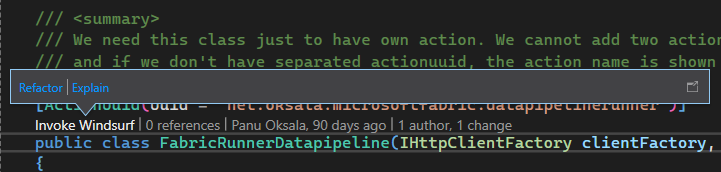
Windsurf integrates into code editor, but does not offer Agent mode
Visual Studio Code
The AI tool landscape for Visual Studio Code is wild. Do you still remember when we used to joke that new Javascript Framework is born in every minute? Well now you can almost say the same for AI extensions for VS Code. Still let’s not get overwhelmed by the offering and stick with the ones that has been battle tested to work.
Cline

Cline (pronounced “Kline”) is an open-source AI development assistant that integrates within Visual Studio Code. With almost 2 million downloads it is one of the fastest-growing AI coding assistants in developer communities and not for nothing. The magic behind Cline is autonomous. You can give it a task, go get some coffee and during that it has crafted the code you asked for. Cline knows how to use command prompt/terminal, it can even use browser to test the code it crafted. Cline supports wide range of models, but as with GitHub Copilot, you will most likely want to stick with Claude Sonnet models.
Using Cline can be a bit expensive and you want to monitor what it does more closely. On average I would say that if you are a heavy user, you can easily consume ~200-400 €/month into tokens. You can reduce the amount by starting new thread every now and then and avoid using the browser feature, but still it can get pretty expensive over time. One of the best features in Cline is plan mode. In plan mode you can plan out the code changes that you would like to implement and when you agree with the model, you can switch to act mode and let it implement the code. This is safer way to work with AI tool as it is not doing any changes until you switch to act.
The problem with Cline is that it has lots of bugs. Sometimes it cannot open the browser, sometimes it gets stuck and stops working, sometimes it does not have permissions to run terminal commands etc. Usually you encounter some kind of bug in every two or three minutes and you have to tinker little bit to get it running again.
Roo Code

“Roo Code” is an open-source AI-powered autonomous coding agent for Visual Studio Code. The GitHub project has almost 18 000 stars and the extension has been downloaded 700k times (30.7.2025).
The Roo Code is a bit more complicated than Cline and that means also that it is bit more powerful. Roo Code has this special “Orchestrator” mode, which can be used to handle complex tasks. The orchestrator mode will split the given task into sub tasks and use correct mode (Code, Architect, Debug, Ask, or custom modes) to handle these sub tasks. Orchestrator can be used to enforce rules like “don’t make files longer than 500 rows”. Roo Code also has the Architect mode which is similar to Plan mode in Cline. In this mode the Roo Code does not implement actual changes. It will just create the “architecture” or plan for the change.
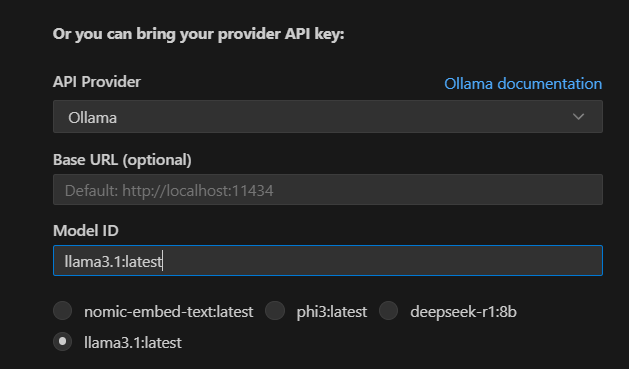
You can easily use Ollama as local model with Roo Code

You will get used to this red colored messages when working with Roo Code
Other Tools
ChatGPT
Good old ChatGPT. If my problem is not related to the code itself, I usually use the ChatGPT to provide some insight. I copy-paste errors from Azure, ask it how to write cursors in SQL Server statements, fix typos from emails etc. ChatGPT is the mother of AI tools. It is fast, it has lots of tricks in its sleeves (like image analyzing) and it provides quite accurate answers. You don’t need the plus version to be efficient with ChatGPT, but you should learn the tricks and capabilities it can do for you. You can find lots of great ChatGPT tips from Reddit, or even ask the ChatGPT to list them for you.
Others
What about the tool X or what about the tool Y??! Well we have other great tools like Cursor, Sora, Midjourney, Notion AI, Grammarly AI, … and the list goes on, but none of them sticks to me. I use them once, maybe twice and forget them. That’s why I wanted to only list tools that I use almost daily. Tools that really has made the impact. Sure there are lots of other great products out there and I (+my dear readers) would love to hear about them! So write a comment below and share what is your favorite AI coding tool today.