Visual Studio 2026 Build Performance
Visual Studio 2026 is now available in Insider preview. You can download it directly from Visual Studio webpage. In Microsoft Dev Blog the VS team talked little bit about the performance improvements that have been done.
Speed shapes what you can build in a day. In 2026, the loops you run most – opening solutions, navigating code, building, and pressing F5 – tighten up. You’ll notice that first launch feels snappier, big solutions feel lighter, and the time between an idea and a running app keeps shrinking. The gains show up on large codebases and they hold across both x64 and Arm64, so your machine’s power turns directly into developer velocity.
As I have x64 desktop PC I decided to give it a try and see how it performs compared to Visual Studio 2022. The comparison is done in Visual Studio Enterprise edition. My PC has AMD Ryzen 9 5900X CPU with 12 cores and 32 GB of RAM. Based on the recommended setup the VS should be able to use 64GB of RAM, but I don’t think it makes that big of a difference. The OS in my computer is Windows 11 25H2.
Benchmarking
For the benchmark I decided to use .NET Framework solution that has 48 projects and approx. ~200k lines of code. The solution contains a few .NET MVC projects, one REST API project, one SOAP API project and rest are DLL projects. I wanted to pick up this solution as it is a real software that is running in production. Not a tuned test project or latest .NET project as I think the major percentage of developers are using older version than latest .NET. Not necessarily.NET Framework, but some other .NET version.
For these tests I did one full rebuild followed by three regular builds in a row
Results
As you can see from the chart below the build times are actually little bit faster in VS2026. It won both rebuilds and had quite even fight in regular builds(3 of 6). There are at least one statistical error in data as one of the regular builds took 51 seconds to complete. On overall the build time difference is not that big to make any difference in practice. The rebuild is second or two faster, but in over 60 seconds that doesn’t matter in practice.
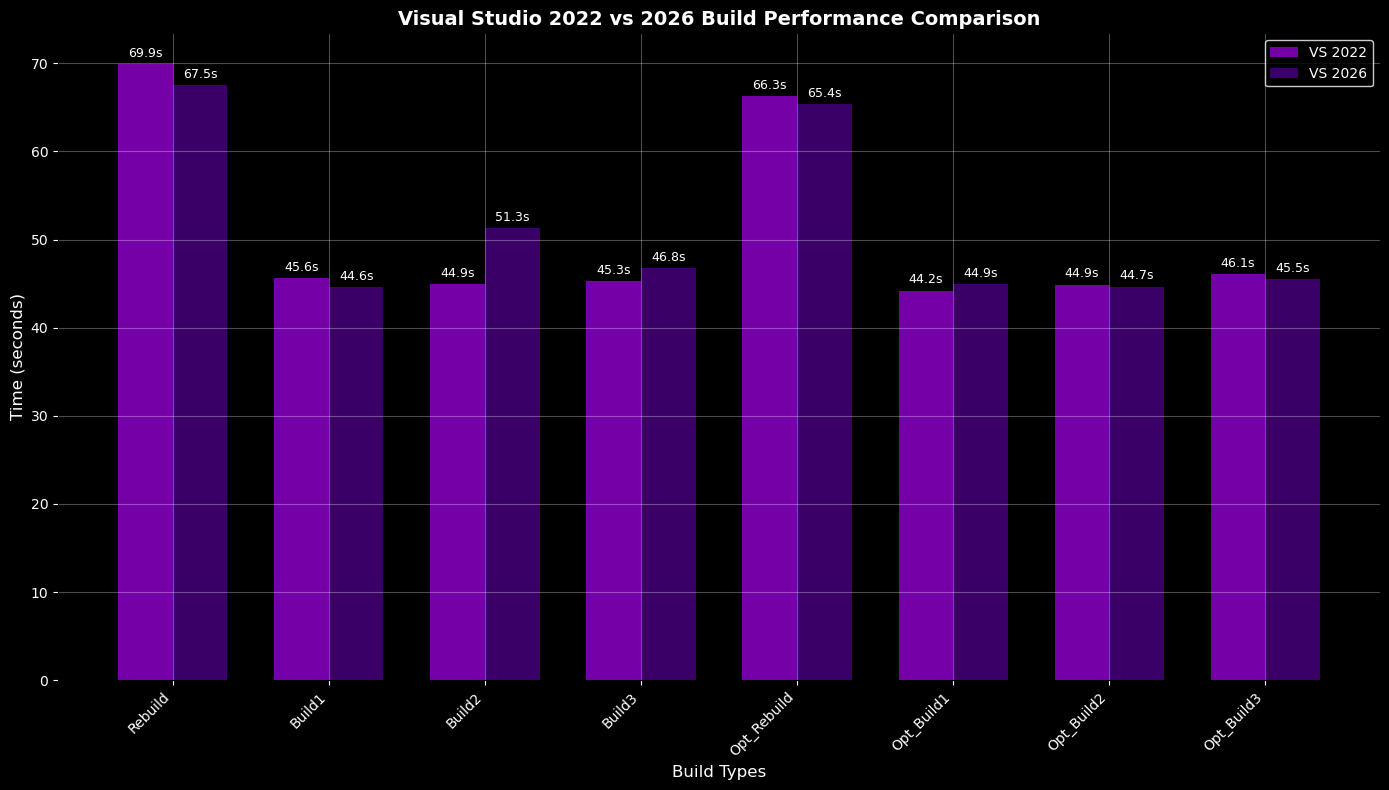
Build times of solution that has 48 .NET Framework projects.
Load and CPU Usage
I captured the CPU usage of both Visual Studio versions and there weren’t a huge difference. VS2026 utilizes CPU cores quite nicely (all cores are involved) and the memory consumption is lower than in VS2022. The memory consumption can be related to test order as I run the VS2026 tests first, so don’t take these numbers without salt.
The red line indicates the moment where solution build started.
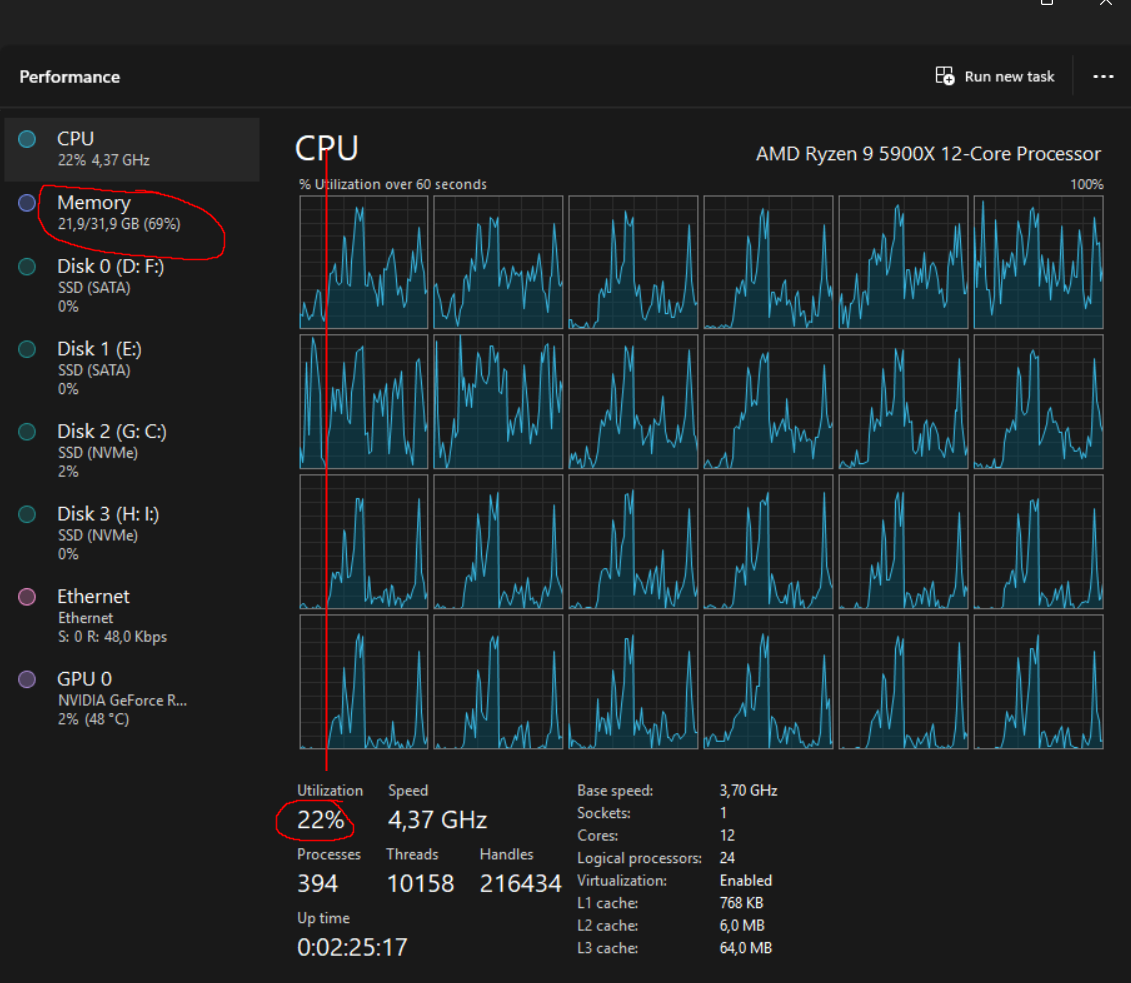
Visual Studio 2026 build utilization
The CPU utilization in VS2022 measurement is also in good level. The moment where this print screen is taken defines the CPU usage percentage quite heavily (if I would take it few seconds later the utilization could be 20%), so that is quite inaccurate.
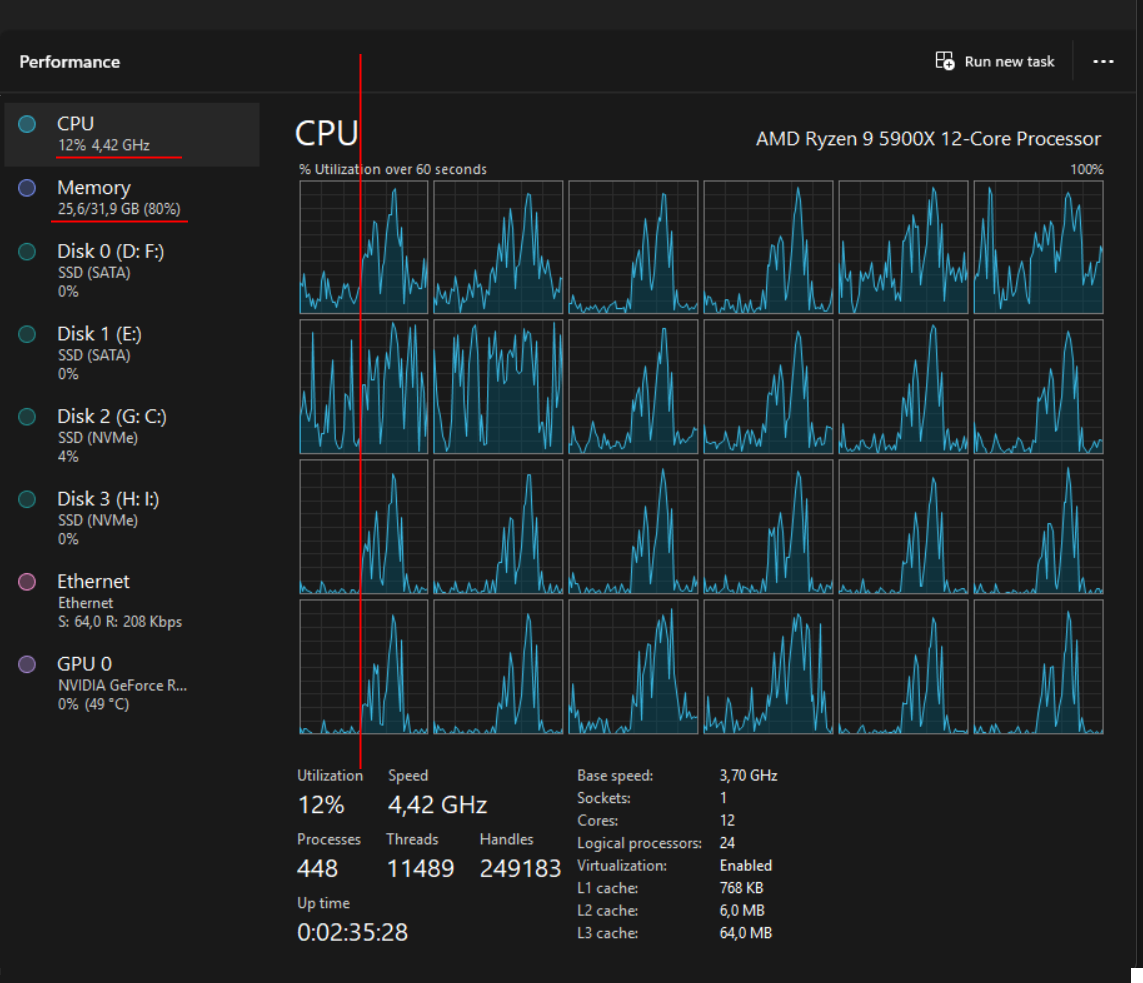
The problem with CPU utilization is, that many of the projects are depending on each other and the Visual Studio cannot build the whole solution in parallel and I want to raise that this is the real life situation usually. Visual Studio needs to first build common project X that is referenced by project Y and Z and then it can start build those two. This leads into situation that projects are build in a row. There is a lot behind the scene that Visual Studio can do during build to do things parallel, but not everything.
Summary
The build performance in Visual Studio 2026 hasn’t increased by much. At least when building .NET Framework projects. I tried to measure the solution loading times also, but it was already in good shape in VS2022 and I couldn’t find big of a difference between 2022 and 2026. It might be little bit faster, but as it is already sub 5 seconds it doesn’t matter to me. For bigger solutions with hundreds of projects the difference might be visible.
On overall performance the VS2026 feels snappier than VS2022. The code files are opening faster and code lens seems to load also faster. The VS2026 is still in Insider preview, so the team can increase the performance in near future. The performance is not main target in VS2026 development, but it is still fun to follow how things are developing regarding the build perf in .NET ecosystem.